

Handling employee leave is one of the core responsibilities of any HR department.When leave balances are mismanaged or tracked manually, it often leads to disputes, payroll mistakes,and unnecessary admin work.Odoo 19 simplifies this entire process through its enhanced Time off module,which now offers a cleaner workflow for leave allocation,accrual planning and real-time tracking.
In this blog,let’s explore how Odoo 19 helps HR teams set up fair, transparent and automate leave management without complicated spreadsheets.
Configuring Time Off type in Odoo 19
Understanding time off types : A time off type is essentially a category of leave.Each type carries its own rule- how it is allocated,how it accrued,whether it affects payroll, and who can approve it. Creating the right structure ensures employees see correct balances HR avoids manual adjustments.
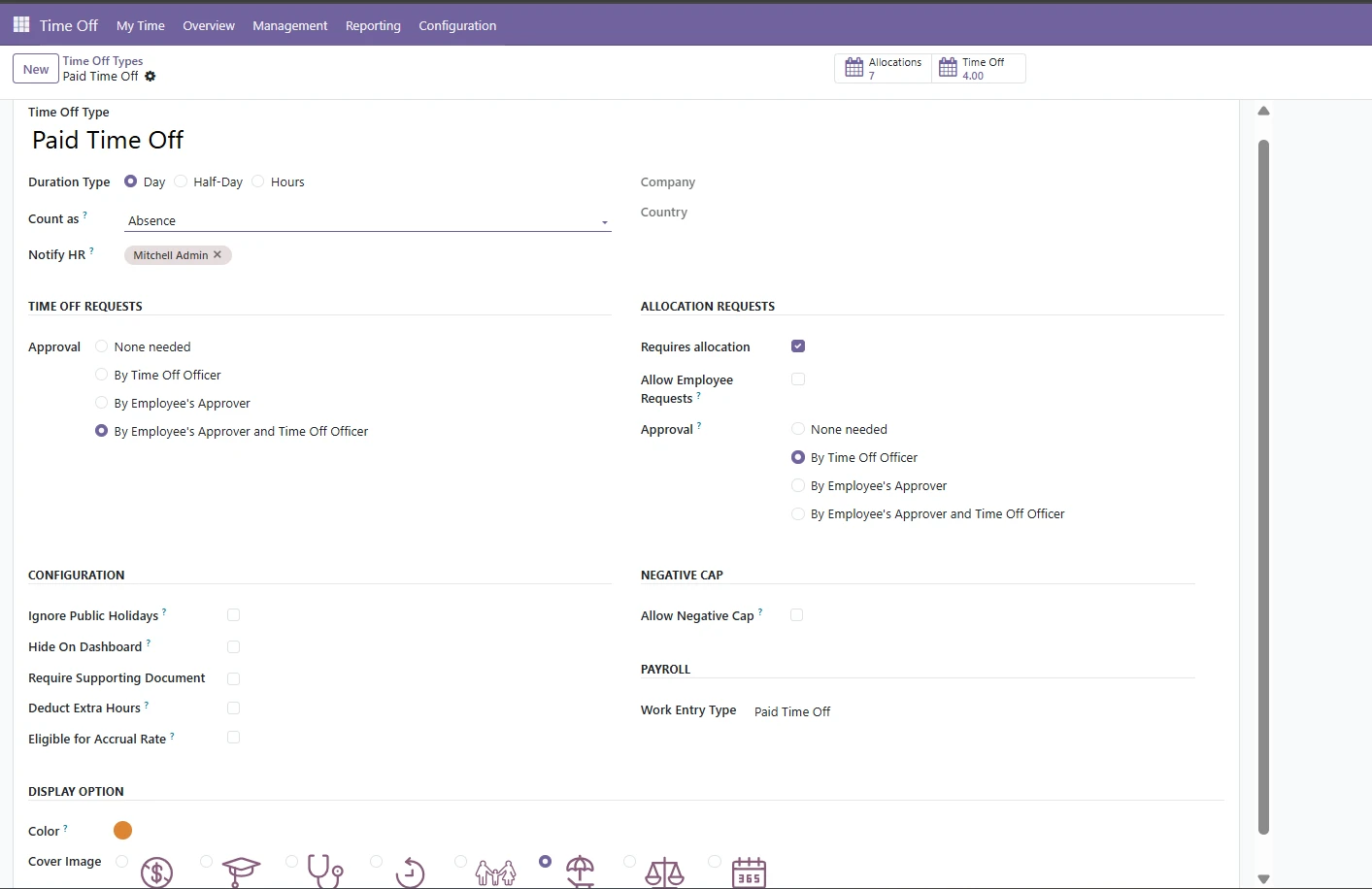
Steps to configure a time off type:
1.Go to Time off configuration menu :-
Time off → Configuration → Time off Types
This page lists all active leave types and allows you to create new ones.
2.Create a New Time off type
Click create and you’ll be prompted to fill in several important fields:
Name of the time off type, Choose a clear name such as:
- Annual leave
- Casual leave
- Maternity leave
- Half-day leave
- Unpaid leave
A good naming strategy avoids future confusion for employee and managers.
3. Set mode of allocation
This decides how employee receive their leave balance.Odoo provides several options such as:
- No allocation requires:- Used for unpaid leave or types where limits aren’t enforced
- Fixed allocation :- The HR team manually assigns a specific number of days or hours.
- Accrual based :- Leave is earned gradually.For example
- 2 days per month
- 18 days per year
Accrual rules are configured separately and linked to this leave type.
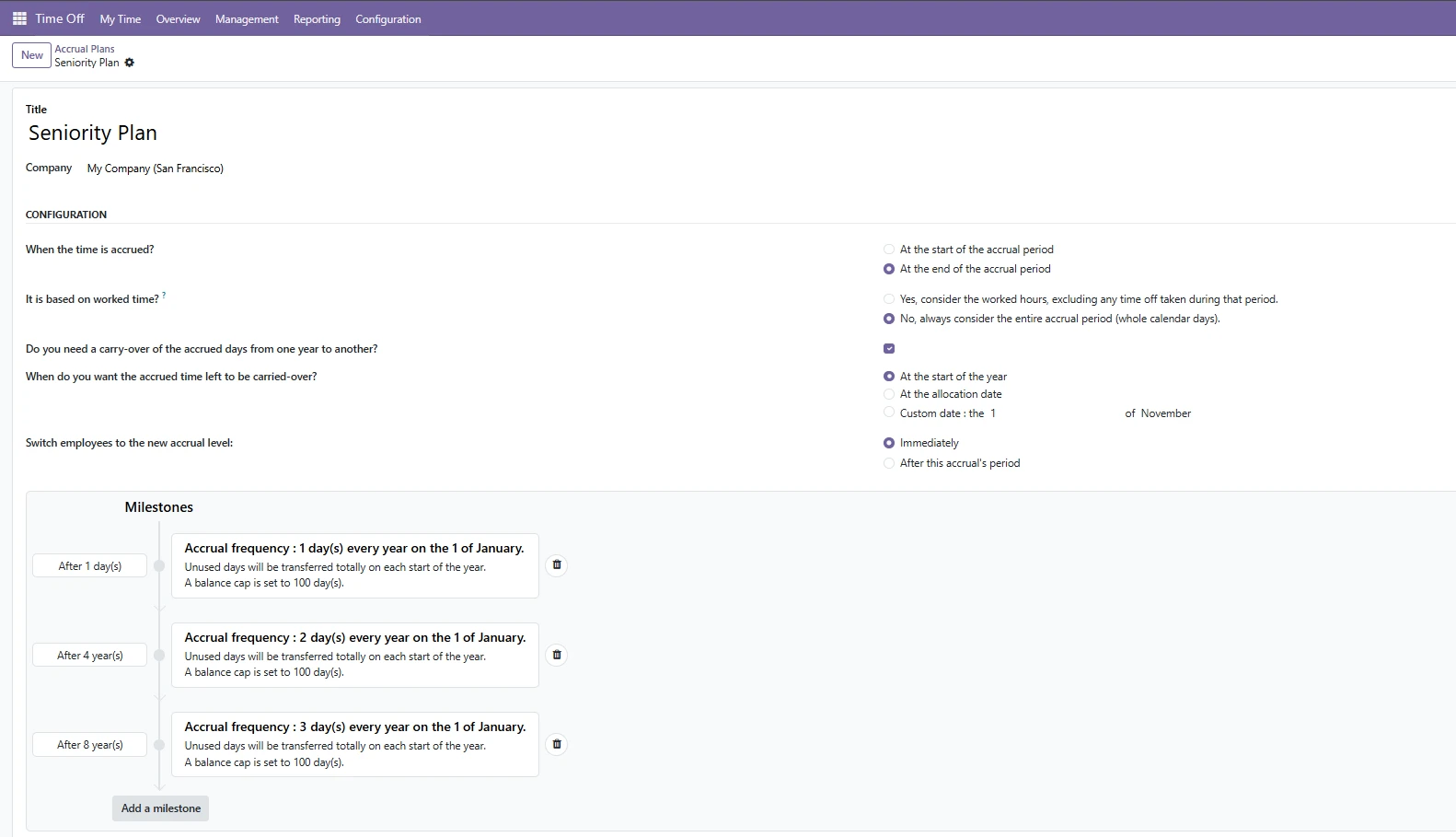
4. Define Payroll
Odoo 19 lets you choose work-entry type, whether time off should impact an employee salary.
5.Approval Rules
Every business has its own process for approving leave.
You can choose:-
- No approval : Leave is automatically validated
- Manager Approval : A direct manager must approve the request
- HR Approval : A second level approval from HR team
Proper approval rules prevent misuse and ensure transparency.
6.Configure validity and restrictions
You can set:
- Validity dates: useful for annual leave cycle
- Allow negative balance : let employee take leave even when they have no available leave balance
- Maximum valid days: To prevent employees from accumulating more than the allowed limit
- Carry forward: If leftover leave is carried into the next particular period.
These settings helps enforce company leave policies accurately.
7.Linking an accrual plan (If required)
If the leave type uses an accrual system,connect it by selecting:-
- Accrual plan→ choose plan
This triggers scheduled update to employee leave balances.
8.Display option for employees
You can decide how the leave type appears on the employee side, possible options :-
- Show in the dashboard
- Hide from employee view
- Allow half-day or hour based leave
- Color code for calenders
Enhancing visibility improves usability for both employees and managers.
Leave Allocation :
Why allocation matters :- Every organization follows its own leave policy - annual leave,sick leave,compensatory off, casual leave and more. Before employees can apply for time off, they need an allocated balance.
Odoo 19 makes this easy by allowing HR managers to assign leave in three ways:
Direct Manual Allocation
Perfect for new joinee,special cases or one-time top-ups. HR can specify:
- Leave type
- Validity period
- Allocation amount
- Allocation type (accrual or regular)
Bulk Allocation
Useful at the beginning of each year or company wise updates.Odoo lets you allocate leave to :
- Department
- Job positions
- Locations
- Entire company
This means HR no longer needs to manually adjust balances as employee complete a year or move to a new leave cycle.
Accrual Plans in Odoo 19
Accruals allow leave to accumulate gradually, instead of giving the full balance upfront.This is ideal for companies that follow monthly or quarterly earning cycles.
How accrual plan works:
- How much leave an employee earns per period
- How frequently the leave is added (monthly/quarterly/yearly)
- Maximum carry forward
- Limit on total balance
- Whether negative leave is allowed
Once the plan is assigned to an employee,odoo automatically updates balances based on the configured schedule.
Clear audit Trail
Every accrual entry is logged with
- Date
- Amount
- Timeoff type
- Responsible user
- Validity
This make leave calculation fully transparent
Employee view : Real-Time clarity
Employee can see:
- Current balance
- Upcoming accruals
- Past allocations
- Time off history
This reduces unnecessary queries to HR and empowers employees to plan their leaves better.
Common use cases:
Monthly earned leave:
Most companies give employees fixed paid leave per month
Accrual rule : Earn 1 day on the last day of each month
Probation restriction
Some companies starts accruals only after probation
Rule: Accrual start date = contract confirmation date
Carry forward with expiry
For companies that allow carry-forward but expire unused leave later
Rule: carry forward max 6 days,expires after 3 months
Compensatory off
Based on approved over time requests
Allocation type : Manual or automated based on attendance
Conclusion
Odoo 19 time off brings a strong, reliable,and automated structure to leave management.From basic allocation to complex accrual logic, everything can be configured to match your organization’s policies.


.jpg )


Leave a comment