

Odoo supports two main accounting methods used globally: Anglo-Saxon and Continental. Each has its own way of handling expenses and inventory costs.
Anglo-Saxon Accounting
✅ What Is It?
Anglo-Saxon accounting is commonly used in countries like the UK and the US, and is best for businesses that want to recognize expenses only when goods are sold. In Odoo, this method is available only in the Enterprise edition and needs to be enabled manually.
⚙️ How to Enable Anglo-Saxon Accounting in Odoo
- Activate Developer Mode
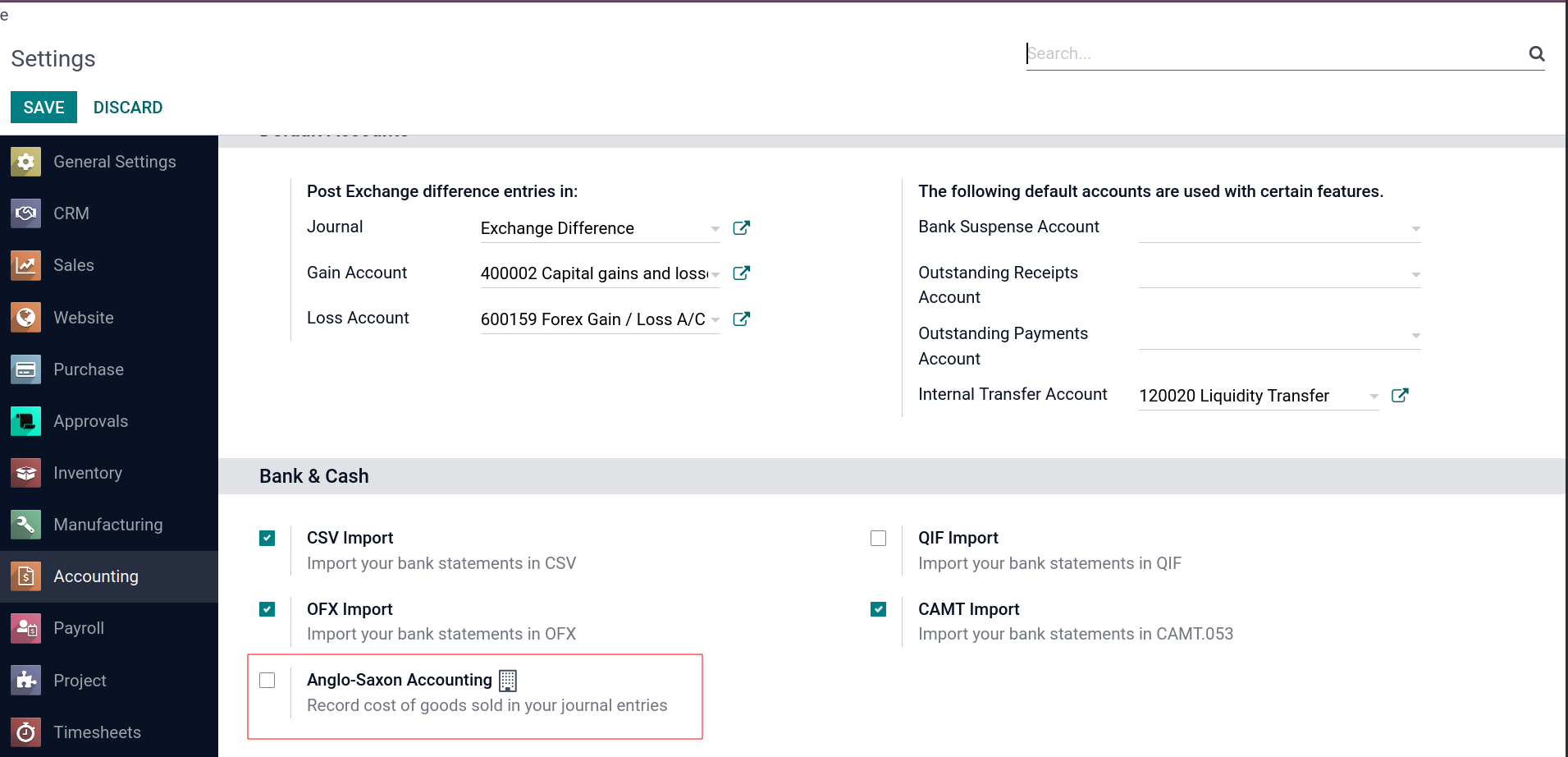
- Go to Accounting → Configuration → Settings
- Check the box: “Use Anglo-Saxon Accounting”
- Click Save
📦How It Works
- Expenses are recorded only after a product is sold or delivered to a customer.
- Receiving products or creating vendor bills does not affect the expense account.
- The cost of goods sold (COGS) is posted only at the time of delivery.
📊Key Features
🧾 Expense Timing: Only after the product is delivered or invoiced to the customer
📦 Inventory Movements: Triggers accounting entries at the time of delivery
💰 COGS Tracking: Real-time and accurate cost recognition upon sale
🔁 No Early Expenses: Product receipts and bills do not immediately hit expense accounts
📈 Revenue-Cost Matching: Revenue and COGS are matched in the same period
✅ Best For: Businesses that want expense tracking based on actual sales
📌 Why Use It?
- Matches revenue and expenses accurately
- Useful for inventory-based businesses
- Helps in better profitability tracking per transaction
This feature is available only in Odoo Enterprise and must be enabled manually.
To activate it, turn on Developer Mode and go to Accounting → Settings, as shown in the image below.
Continental Accounting
✅Overview
Continental Accounting is the default method in Odoo. It is widely used and ideal for companies that want to record expenses as soon as purchases are made. No setup is required — it works out of the box.
⚙️ How It Works
-
Create a Purchase Order
-
When goods are received in stock, Odoo:
- Automatically records the expense
- Creates related journal entries
3. When a vendor bill is created, Odoo links the expense to Accounts Payable.
This ensures that expenses are reflected immediately in the Profit & Loss report.
📊Key Features
🧾 Immediate Expense Posting: Expenses recorded when goods are received or billed
🧮 Default in Odoo: No extra configuration needed
🕐 Real-Time Reporting: Updates P&L instantly upon purchase
📉 Stock Impacts: Cost recorded upfront rather than at delivery
✅ Best For: Businesses that want upfront expense recognition
🔁Switching Between Methods
By default, Odoo uses Continental Accounting. To switch to Anglo-Saxon Accounting:
-
Enable Developer Mode
-
Go to Accounting → Configuration → Settings
-
Enable the checkbox “Use Anglo-Saxon Accounting”
💡 To stay in Continental mode, keep this box unchecked.
❌ When Anglo-Saxon Is Enabled
- Odoo stops posting expenses during purchase or goods receipt.
- Expense is only recorded when the product is sold or delivered.
- This allows for accurate cost-revenue matching, but delays expense recognition.
If you do not want this behavior, go to settings and disable Anglo-Saxon Accounting.
Choose the right accounting method in Odoo and align your books perfectly with your business goals. Optimise your financial accuracy with smarter accouting with your reliable partner, Veuz Concepts, Odoo ERP Solutions!


.jpg )


Leave a comment