

Payment integration has become an integral part of every business in today's modern world. Businesses require quick, secure, and integrated ways to receive payments for their products and services via sales orders (or invoices), subscriptions, vendor payouts, and so forth through their ecommerce or business systems. Odoo has developed into a comprehensive solution for all these functions and allows businesses to integrate with several different payment provider solutions through its system. So, whether you have an online shop, provide service-based solutions, or send out recurring invoices, payment integration in Odoo will help you become more efficient, reduce errors, and enhance your customer experience.
What is Payment Integration?
Payment integration refers to linking your business system with a third-party merchant service provider (e.g., Stripe, PayPal, Razor pay, your local credit card processor, or another merchant account provider). When you connect with these services, every payment made by customers is automatically recorded within the system, which eliminates manual recording of payment data and speeds up the process of reconciling transactions. Payment integrations within Odoo work across multiple apps, including eCommerce, Sales, Accounting, Subscription, POS and Invoices.
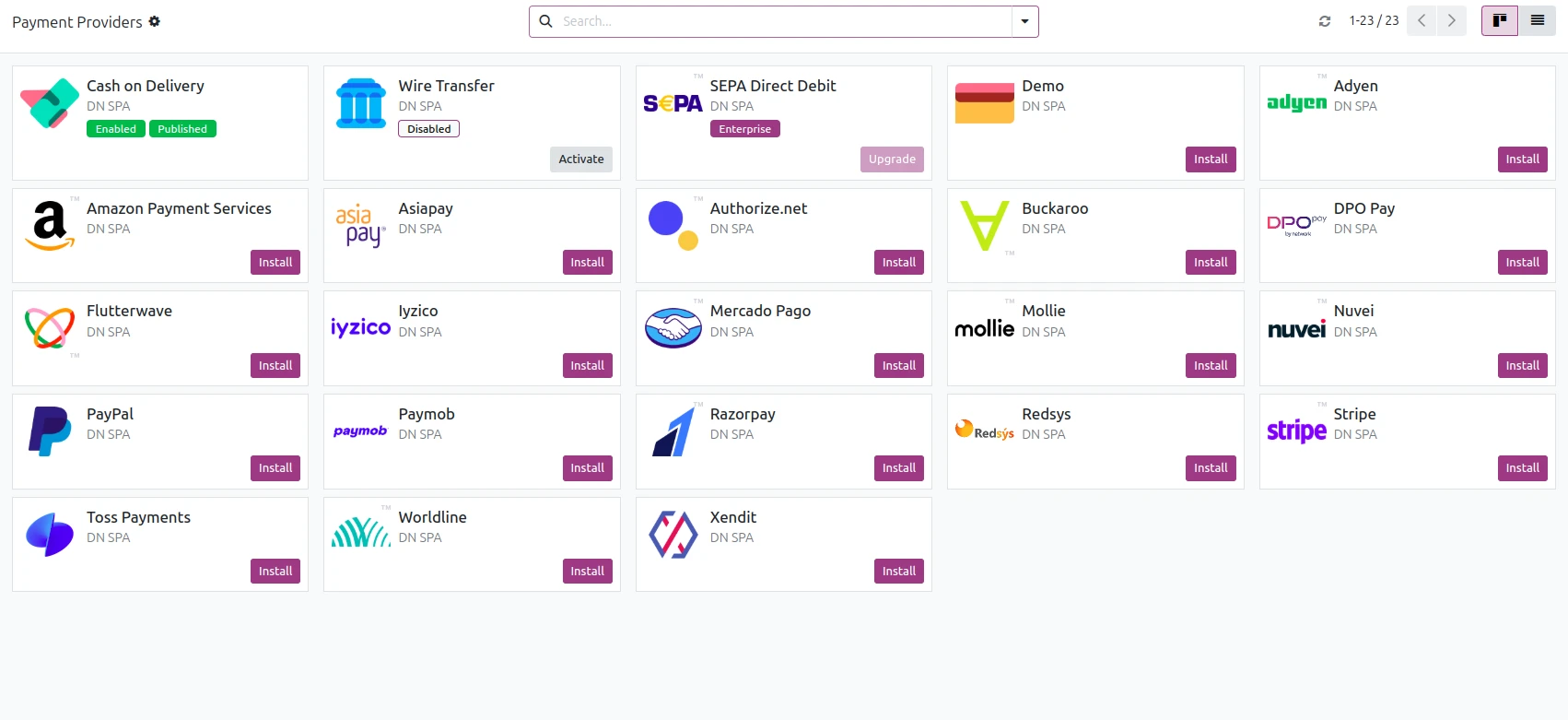
How Odoo Helps Businesses with Payment Solutions
-
Odoo offers pre-built connectors to its users for all major payment processors, allowing users/installers to use the appropriate connector for their business. These connectors can be set up with no coding involved, making it easy for a company to activate the connector they want to use and start accepting payments. Odoo also supports local payment processers by allowing users to build their own connectors using Custom Modules or Third-Party Connectors, giving companies the ability to have a global presence or support for a local customer base.
-
The following is a short list of popular payment processors that are supported by Odoo:
-
PayPal is recommended for international payments because it's a trusted payment processor for both businesses and consumers.
-
Stripe is the only payment processor that supports cards, wallets, and recurring payments.
-
Razor pay is one of the most used payment processors in India, allowing customers to pay using a variety of methods, including UPI, cards, and wallets.
-
Some larger businesses use Adyen, Authorize.net, or Amazon Pay as their payment processors.
Top Benefits of Payment Integration with Odoo
-
More Efficient Processes: All journal entries, confirmations, and payments will be created automatically, providing the financial department with less manual entries.
-
Customer Confidence: Extensive information will be available on payment status as well as online invoice payments (or quick checkouts) which helps to create a sense of security for customers that they made their payment successfully.
-
Easier Reconciliation: All bank statements will be automatically matched with payments in the accounting module of Odoo, thus maintaining the books accurately and making them easily available for audit.
-
Recurring Payments Made Simple: Recurring Payments (by Subscription) with Odoo allow for easy collection of recurring payments every month or year through providers (such as Stripe and Razorpay).
-
Secure Payment Data: Payment data is encrypted and stored securely. All payment transactions are processed through trusted gateways. Therefore, companies can maintain their compliance with regulatory payment security standards.
-
Multiple Integration Capabilities: Whether you are using an online checkout process or are using an online invoice or point of sale (POS) system to receive payments, all of this information is "interconnected" within one central system.
Examples of Practical Application in a Business Setting
-
eCommerce Store Purchase/Payment Process: Customers can use the checkout page to complete their order and payment. When payment is successful and verified, an Order Confirmation will be sent via email to confirm the order was completed.
-
Invoices can be paid directly from the customer portal or from an invoice email when clicking on the "Pay Now" button in the email. Once Odoo has processed and received payment for an invoice, Odoo will automatically update the invoice status to Paid.
-
POS Payment: Payment through either integrated credit card readers or mobile payment applications in your business will be accepted.
-
Subscription: Payment processing for Subscription Services, Software Subscription, and Equipment Rental Payments will be processed automatically through the regular subscription payment cycles.
To configure the payment integration (basic steps) the first thing to do is to navigate to Website > Configuration > Payment Providers. Select the Payment provider you wish to use and enable it.
Next, input the API key, secret key, or Merchant ID given to you by the Payment provider.
Choose what on your website to allow users to see when selecting payment methods (credit cards, UPI, wallets, etc.).
Decide which accounting journal will be used for recording payments.
You can then test your connection using the test/sandbox mode.
Finally, go live! The above steps are relatively simple and don't require any technical expertise. Any functional consultant or finance person can follow the above steps to set it up with ease.
Custom Payment Gateways in Odoo
There are many countries around the world that have their own local payment gateways that are not automatically included. In these instances, businesses may:
Utilize third-party modules from the Odoo apps marketplace
Create a new module
Integrate directly with the bank using either an API or a software development kit (SDK). As such, businesses are able to accept payments from virtually anywhere in the world. Odoo 17 and Odoo 18 Improvements for Paypal and Credit Card Payments. Both newer versions of Odoo will provide enhanced support for payments:
-
More Payment Provider Connectors
-
More Efficient webhook processing
-
A more enhanced user interface for online payment pages
-
Enhanced security to help prevent fraud
-
Ability to collect payments through a Point-of-Sale Terminal (POS)
-
The ability to automatically collect payments on Subscription Type products
With the newer 18 version, Odoo has removed the deprecated tree tag, and has created a new list tag to more appropriately represent how payment interfaces are built in the modern world and created modern styles to meet the needs of developers.
Enhancement of Payments with Odoo 17 & 18.
-
The Release of New Odoo 17 and 18 has Improved their Integration with Payment Providers providing the following:
-
Increased number of Payment provider connections,
-
Improved processing of Webhooks,
-
More User-friendly payment page UIs,
-
Increased protection against Fraud,
-
Functional POS terminal payment options,
-
Recurring billing capabilities for Subscription Auto Debit.
Best Practices:
1) Test in Sandbox Mode prior to Making it Live
2) Provide Meticulous Listings of Journal Names (i.e. Online Payments – Stripe)
3) Enable Webhooks to Receive Real-Time Payment Notifications
4) Ensure the Currency Used within Your System is Always Synced to the Currency Used by the Provider
5) If Your Business Utilizes Multiple Providers, You Should Have Separate Journals to Maintain Tracking Consistency
6) Train Your Financial Team on Using the Odoo Reconciliation Dashboard
7) Match the Refund Policy in Both Odoo and the Provider
Because Odoo's payment integrations provide the benefits of automation and tracking for online payments, they represent an incredible opportunity for reducing workload in businesses across all industries. With the ability to work together with multiple applications across different channels, the integration of finance teams into Odoo allows for finance teams to use their time and resources more efficiently because they can automate many of the tasks currently performed by finance personnel and monitor them without requiring additional manual input or work.


.jpg )


Leave a comment