

The financial aspect of your company must be navigated using a sturdy and easy-to-use application. Odoo 18 is precisely that with its advanced, yet easy to navigate accounting software, designed for businesses of any size. Whether you are a small business owner, or a CFO with varying degrees of experience, one necessary step to seamless financial reporting, undoubtful compliance, and insights for strategic planning is knowing its core components: journals, a chart of accounts, and bank and cash management. Let's explore the arms of these foundations and unleash the capabilities of Odoo 18 Accounting.
1. Journals: The Essence of Transaction Recording
In Odoo, journals are more than just ledgers—they are avenues for every financial activity. You may look at them as personalized journals for a distinct business activity. The best part is that while your team does every day activities: getting vendor bills, mailing invoices to customers, or recording employee expenses, Odoo will create the complex journal entries automatically in the background. Odoo's double-entry accounting will take care of that by ensuring every transaction impacts at least two accounts (a debit and a credit), keeping your ledger accurate and balanced.
It is this automated setup along with the real-time accuracy and full transparency on each financial activity, from the moment you start the transaction, that is the core of the power of Odoo accounting.
Just the Details: Setting up Journals
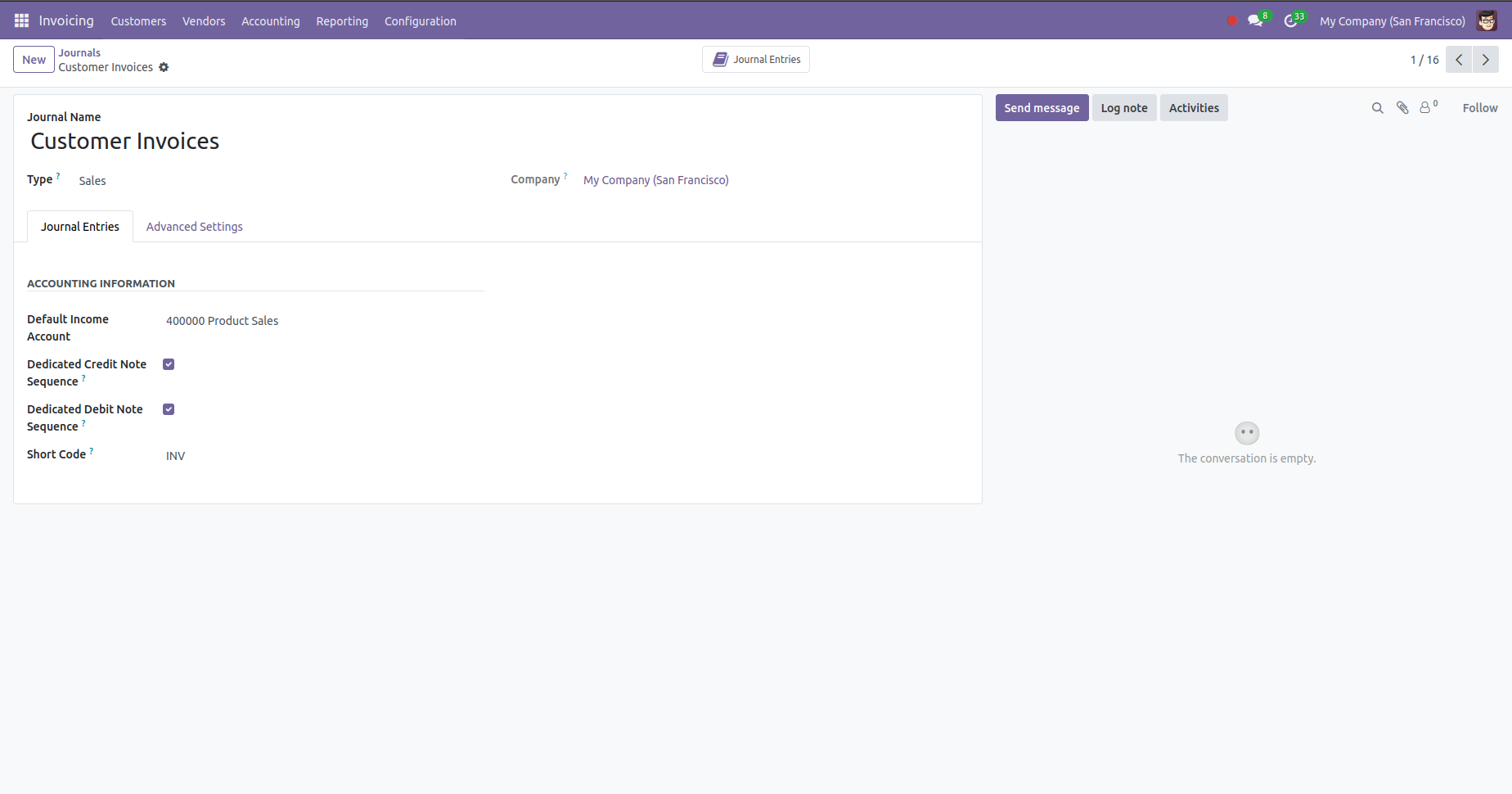
Having journals set up properly is vital to your accounting workflow. You can access and manage journals by navigating to Accounting > Configuration > Journals.
2. Chart of Accounts (CoA): Your Financial Framework
The Chart of Accounts (CoA) for your entity is the structured framework of your company's financial framework. The CoA is a comprehensive and organized listing of all accounts where transactions can be recorded and summarized into one of five primary categories: Income,Expenses,Equity,Liabilities, and Assets. The structured CoA enables precise financial reporting, including Balance Sheet & Profit & Loss statements, or whatever your accounting software allows.
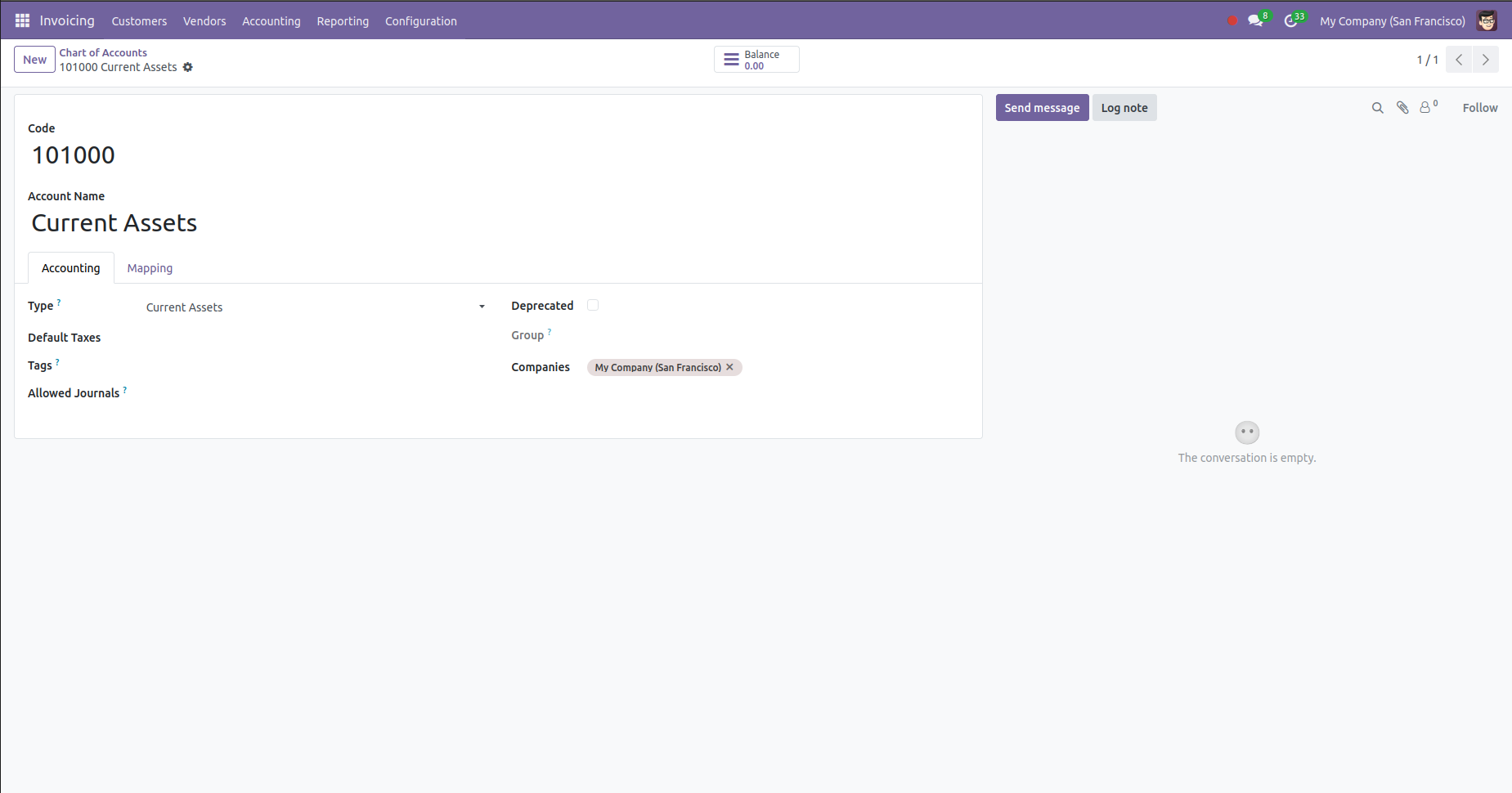
You can view and access your Chart of Accounts, in the Odoo application, under Accounting > Configuration > Chart of Accounts. The interface allows you to quickly search, filter and sort each accounts based on the account's code, name, or account type. A significant readability enhancement for very long lists of accounts, is the ability to group accounts into a parent account.
Another benefit of using Odoo is its fiscal localization. When you initiate Odoo, the CoA is dynamically loaded for your company based on your country of domicile. This ensures compliance with local accounting regulations while also providing a legally acceptable base for your CoA setup, thus alleviating a significant amount of time wasted to sort through accounting regulations and guidelines.
Setting up your customer accounts is uncomplicated. To set up a new account, just click "Create." Most importantly, you fill in it's Type (Expense, Income, Asset), its unique numerical code, and its name or description. The account Type is significant because this indicates where the amount will appear in your financial reports. You may also set default taxes and/or indicate accounts (which is seldom used) as deprecated so your chart can remain as uncluttered as possible and up-to-date.
Basically, a properly defined CoA gives you the understanding and insight required for making such decisions by converting your random financial data into useful reporting information.
3. Bank & Cash: Tracking Real Money
Odoo makes it easy to manage your bank and cash journals - two critical items for tracking liquidity and reconciling cash with real cash flows. By simply selecting the right account type, you can create and configure a bank or cash account under Accounting › Configuration › Journals. Odoo even populates the journal and account entries for you. Bank reconciliation has been improved in Odoo 18 using a simpler interface and smarter auto-matching models. Access to bank statements can be found in Bank Reconciliation View, where you can view it broken down into transactions, automatic counterpart entries, and resulting entries.
Start using Odoo 18 Accounting
When you first open Accounting in Odoo you will be greeted with a full onboarding wizard:
- Create fiscal periods
- Add your bank account.
- Create taxes
Finish the Chart of Accounts.
If you have never done accounting before our no-fail, quick-start, easy to follow process will help make you feel comfortable.
Conclusion: From Complexity to Strategic Clarity
Odoo 18 accounting module aims to make financial management easier. It does this by transitioning from complicating and reacting to acting proactively and with intention. It embeds finance into your everyday responsibilities by automating the necessary work of journal entries, providing a compliant and scalable Chart of Accounts, and operating a very sophisticated process for bank reconciliation.
In this way, you will come to have an accurate and up-to-date picture of your business financial position with the assurance your bookkeeping is accurate! Gaining knowledge of these basic components, such as journals, the chart of accounts and the management of your bank and cash, takes you to an area of value beyond just recording the past.



.jpg )


Leave a comment