

In the current demanding market, an effective CRM platforms transcends more utility it functions as the core operational mechanism for driving consistent scalable sales growth. For organization utilizing Odoo 19 the unified CRM module offers a sophisticated platform to cultivate potential leads, monitor deal progression and govern CRM comprehensively from initial contact through to deal closure. This guide will clarify the fundamental components odoo19 CRM, concentrating on the crucial elements of the pipeline, lead conversion process and activity scheduling.
The CRM Pipeline:
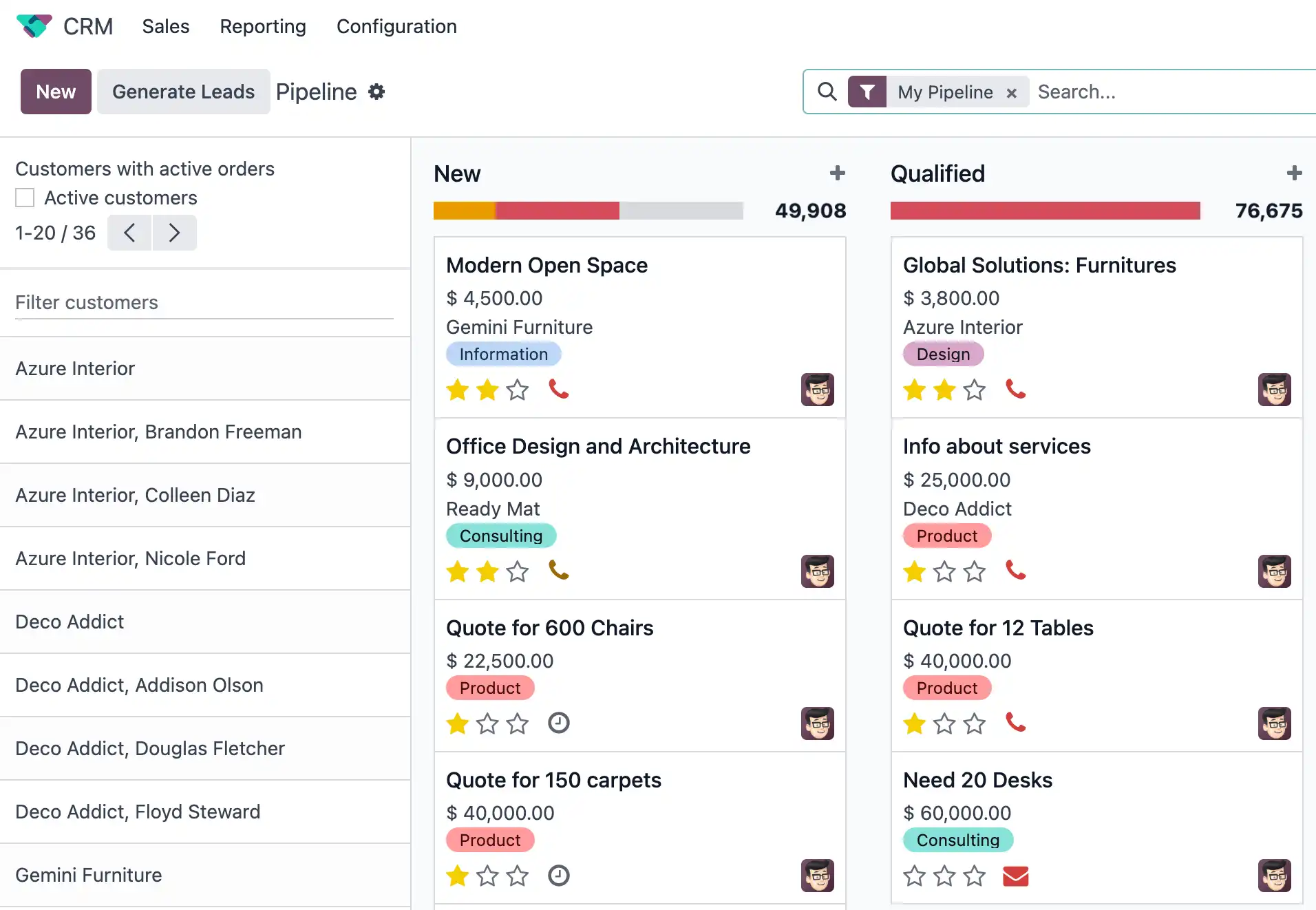
The pivotal organising element of Odoo CRM is the sales pipeline which is visualized as an adaptable kanban style board.
1. Understanding Pipeline Stages
The pipeline structures your potential deals into columns representing the various phases of your sales process. Common, pre-defined stages include:
-
New: Initial leads that have just entered the system, often unqualified.
-
Qualified: Leads who's potential and needs have been verified bt a salesperson.
-
Proposition: Leads who have received a formal offer or quotation.
-
Won: Closed deals that have resulted in sales revenue.
Odoo allows you to easily customize these stages to perfectly match your unique sales cycle.
Creating and customizing stages
To ensure the pipeline reflects your business you can easily clicj the ‘+Stage’ button at the top of the pipeline to instantly add a new Column, further more by clicking the settings/gear icon next to a stage name , you can edit its properties. This allows to set specific requirements for moving opportunities into that stage, mark it as the ‘Won’ Stage, or even fold it in the Kanban view to keep your display clean.
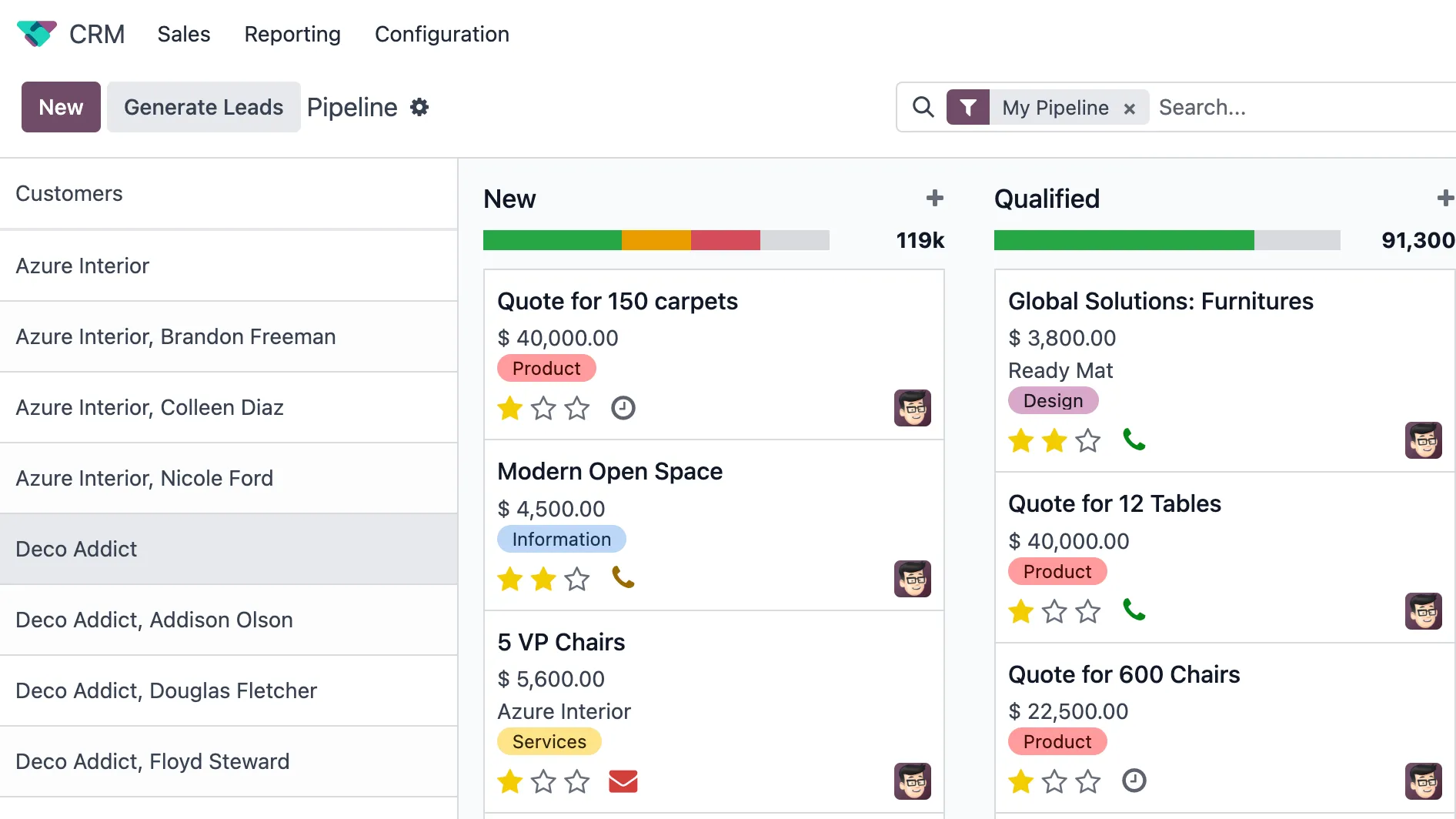
Each Opportunity card in the pipeline shows key information at a glance, such as the potential customers name, the expected revenue and its priority (often marked by stars). Crucially, the total Expected Revenue for all opportunities is displayed at the top of each stage column, giving you an immediate financial overview of your sales funnel’s value.
Drag and Drop management
One of the most user-friendly attributes is the drag and drop functionality. Salespeople can move an opportunity from one stage to the next wirth a single click and drag. This physical action is not merely visual, it automatically updates the stage field on the record and simultaneously recalculates the expected revenue totals within the pipeline, maintaining your sales metrics real time and accurate.
2.Lead Management: The first step to conversion
In Odoo 19, a clear distinction between a raw lead and a qualified opportunity is maintained. Leads are raw inquiries that require initial scrutiny and validation (BANT: budget, authority, need, and timeline) before they can be considered a viable deal.
Lead Acquisition and Enrichment
Odoo19 provides multiple smart ways to capture leads:
Inbound Automation: Leads are automatically created from website contact forms, dedicated email aliases, and live chat interactions.
Business Card Scanner: A significant mobile-first improvement allows sales reps to instantly scan a business card to auto-create a lead record, saving valuable field time.
Lead enrichment: Using the platform's IAP service, you can enhance a lead's information, pulling company size, industry, and address simply from an email address, providing a 360-degree customer view before the first call.
Converting to an Opportunity
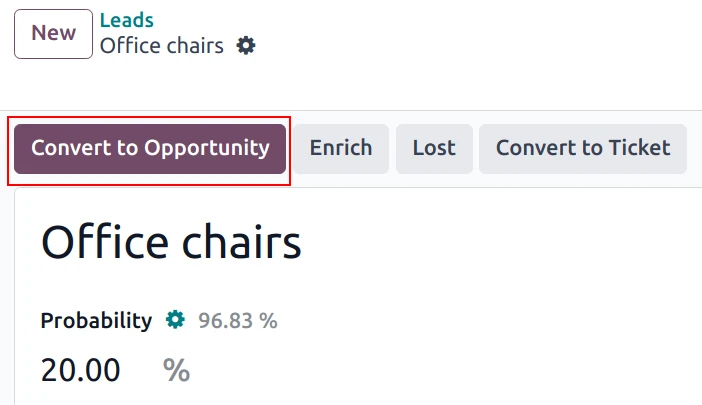
Once a lead is Qualified, the process moves to conversion, Clicking the ‘Convert to Opportunity’ button brings up a critical modal window.
1. Conversion action: Decide whether to Convert to Opportunity (creating a new deal) or merge with existing opportunities to prevent duplicates.
2. Customer Handling: define how the contact is handled , create a new customer, link to an existing customer or do not link to a customer.
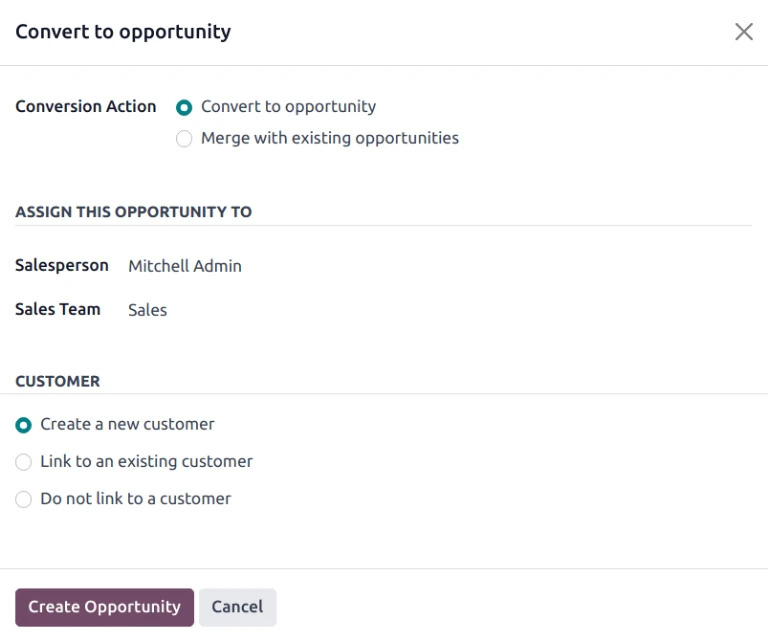
Choosing these options correctly ensures clean organized data that is very important for reporting and future marketing efforts.
3. Activity Scheduling : Never Miss a Follow – up
The Odoo 19 CRM is designed to make sure nothing is forgotten, the activity feature translates the entire sales cycle into an organised series of assignable , trackable actions.
Streamlined Scheduling
When you open a lead or opportunity you can click the Activity button or the corresponding icon on the kanban card to schedule your next action.
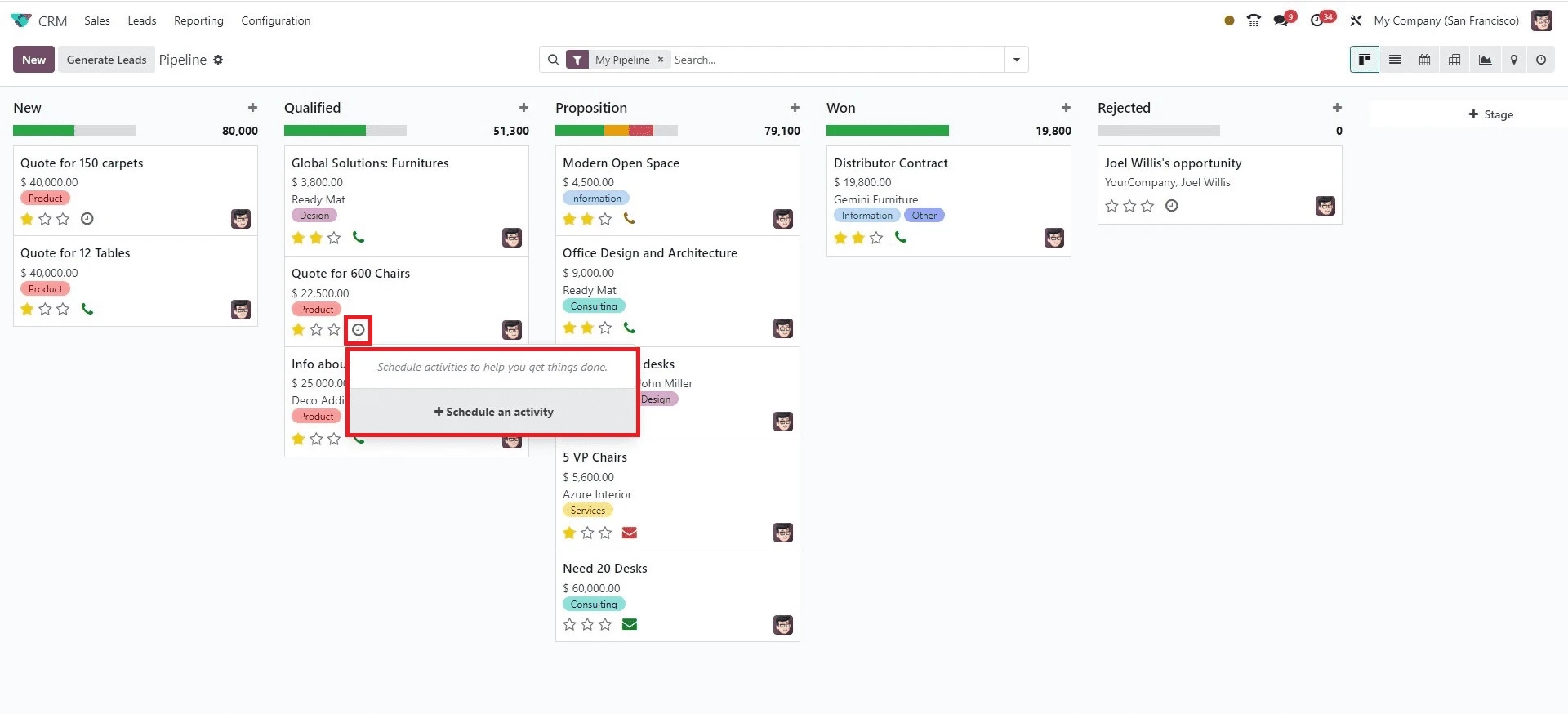
Simplified modal : Odoo 19 introduces a simplified activity modal for a faster creation. You can select the Activity type (call, meeting, TO DO ) enter a summary e.g. “Discuss proposal pricing”) and set the due Date
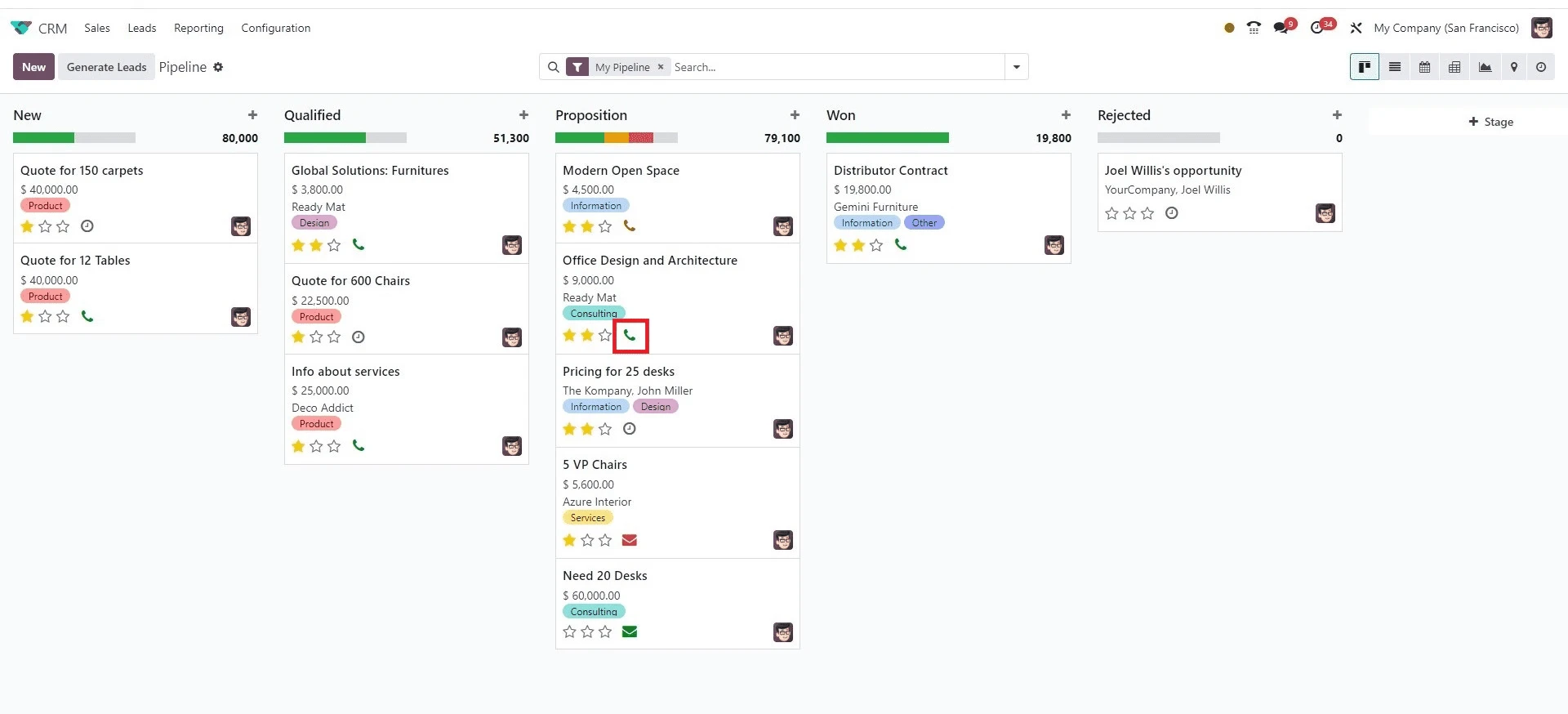
Quick Reschedule : New shortcuts allow you to reschedule a late activity to “today” ,”tomorrow” or “next week” with a single clcik reducing friction in maintaining a clean to do list.
Activity plans & chaining : For complex sales cycles you can set up predetermined Activity Plans ie. Sequence of tasks.
Completing one task can automatically initiate the scheduling of the subsequent one e.g., call done -> schedule meeting.
Visual Tracking: On the Kanban card icons for scheduled activities are visually categorized by colour: Green - upcoming, Orange - due today, and Red - overdue, providing an immediate visual prompt for action.
4. Reporting:
In Odoo 19 the reporting module shows simple data tracking by offering powerful, customizable analytics that drive strategic decision-making.
Pipeline Analysis: View your data in pivot tables or graph views (bar, line, and pie) to analyse conversion rates between stages, identify bottlenecks, and measure anticipated revenue by sales team or salesperson.
Advanced Analytics: New advanced visualizations specifically using funnel charts are indispensable for mapping client flow, quickly identifying conversion gaps, and pinpointing exact areas where potential deals are lost.
Win Rate Analysis: Improved analytics allow managers to drill down into win rates based on specific criteria, giving clearer feedback on what strategies and team members are most effective.
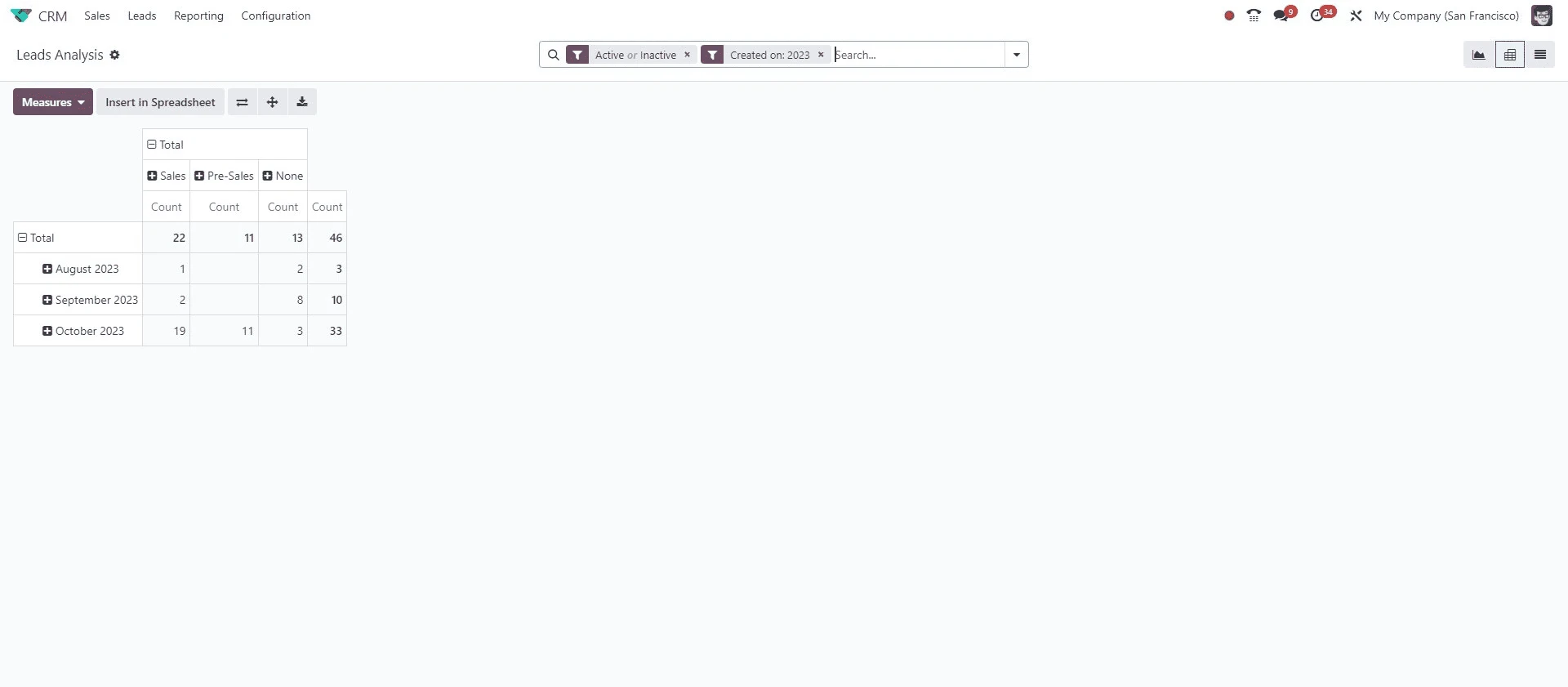
By mastering these fundamentals in Odoo 19 the smart pipeline, enriched lead management , efficient activity scheduling and advanced reporting, you equip your sales team with the tools necessary not just to manage customer relationships , but to accelerate growth.



.jpg )


Leave a comment