

Subscription-based services are now a core revenue model for many businesses, whether maintenance contracts, memberships, or recurring product delivery. To support this, Odoo 18 offers a fully integrated subscription management system that is simple to operate from a functional perspective, while still being powerful.
This blog explains the default functional workflow of subscription management in Odoo 18, focusing purely on how business users interact with the system.
How to Use Subscription Module in Odoo
In Odoo, subscriptions are not created as separate menu. Instead, they naturally evolve from the sales process.
A subscription starts as a quotation, becomes a sales order, and then turns into an active subscription.
This helps the sales teams, finance teams, and customers all aligned within the same workflow.
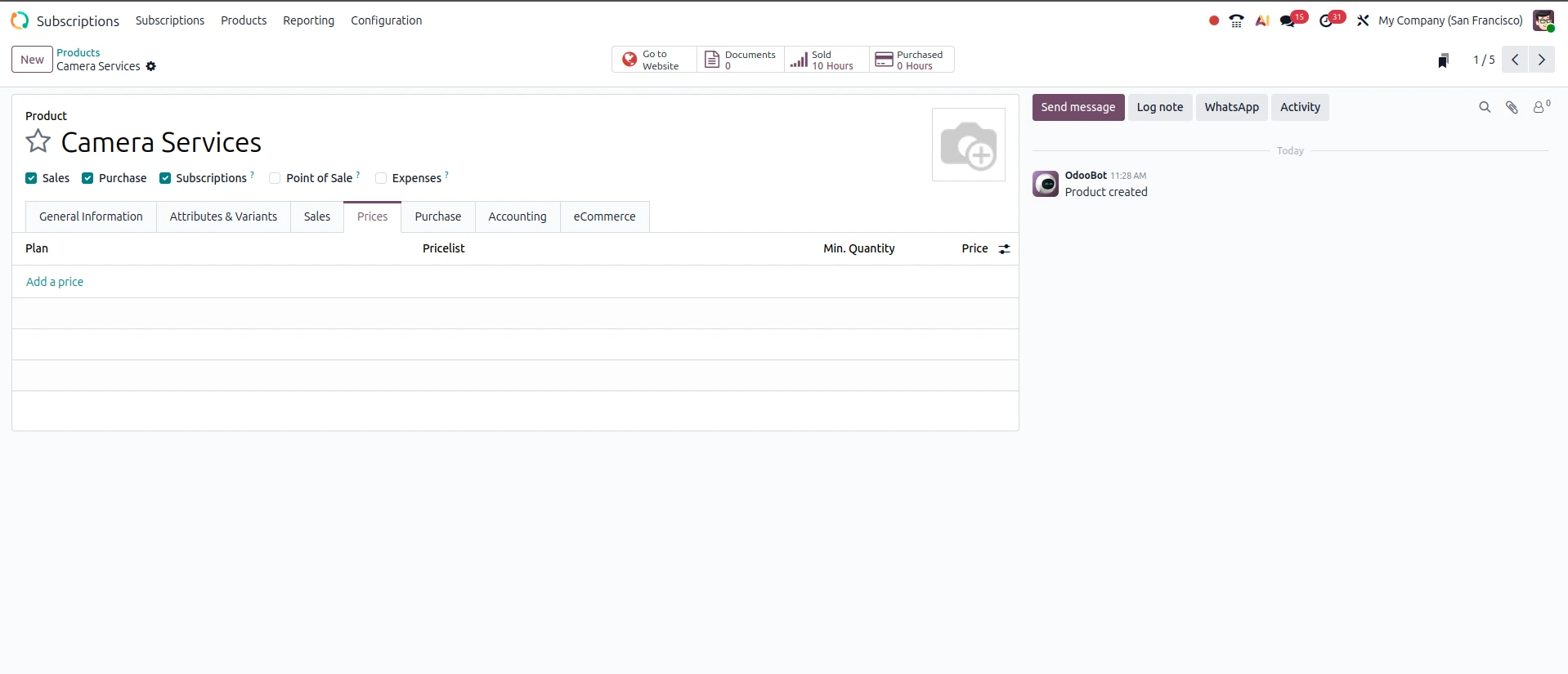
Creating Subscription Products
Firstly, we need to create products for subscriptions
From a functional standpoint, these are simply services that customers are billed for on a recurring basis, such as:
-
Monthly software access
-
Annual maintenance contracts
-
Membership plans
Each product is linked to a subscription plan (like monthly or yearly), which defines how often the customer will be billed.
This setup is usually done once and reused across all customers.
Creating a Quotation
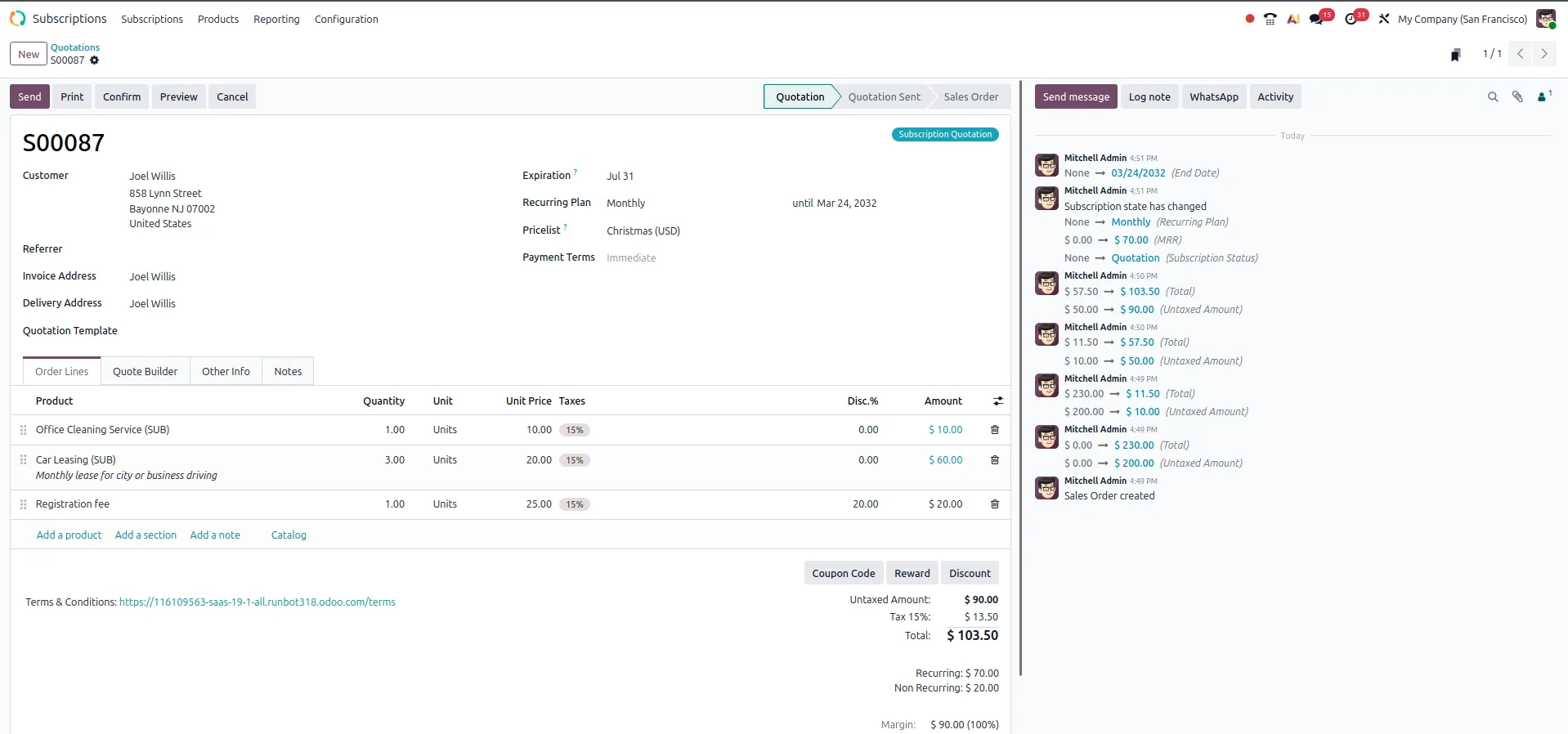
When a customer is interested in a subscription:
-
The sales team creates a quotation
-
Adds the subscription product
-
The system automatically applies the correct billing plan
At this stage, everything works like a normal sales process in Odoo.
Confirming the Sale
Once the customer approves:
-
The quotation is confirmed
-
Odoo automatically creates a subscription
-
The subscription becomes active (In Progress)
From this moment, the system takes over most of the repetitive work.
Auto-generating Recurring Billing
A major benefit of the Odoo Subscription Module is the ability to utilize automated workflows.
Using your selected plan:
-
Odoo will auto-generates invoices (weekly/monthly/yearly, etc.)
-
Pre-calculated billing dates (e.g., next billing date, previous billing date)
-
No manually create invoices
Customer subscribes on the first of the month to a Monthly plan
e.g., Odoo will generate invoices for Feb 1st, Mar 1st, etc
Advantages of using Odoo to auto-generate invoices:
-
Timely Billing of Customers
-
Less Manual Work to Create Invoices
-
Consistent Cash Flow
Subscription Lifecycle Management
Odoo has clearly defined subscription stages to track a subscription's status.
Active (In-Progress)
Subscription has been Created and Invoices are Being Generated
Paused
Temporarily no billing - For Customers who request to place a subscription on hold.
Closed
Subscription is Complete - No More Invoices will be Generated
These stages of subscription help your team to gather all the information about each customer's status quickly.
Modifying Customer Subscription (Upselling)
Businesses require the need to modify subscriptions; upgrade/change/add things to customers' subscriptions; and modify the pricing of a subscription.
Odoo provides the ability to what is known as Upsell.
What this does for you is provide your sales team a new quote that matches the Existing Subscription.
Your sales team can then Modify Products/Prices on the new quote, and then modify the customer's subscription once you confirm the modified quote.
This allows you to increase your Revenue from Existing Customers and meet the Changing Needs of Your Customers.
Subscription and Renewal Management
All subscriptions can be infinite, or finite.
If they are finite: Odoo will record the end date of the subscription.
The subscription will automatically stop billing when the subscription ends.
There are two ways to renew an Odoo Subscription:
- The automatic option is the system-supported renewal, which allows you to continue using your subscription without interruptions.
- The manual option allows you to extend the term of your current subscription by selecting the appropriate plan.
Either way, you will be able to effectively execute your contract and avoid losing out on renewal opportunities.
Odoo also includes a customer self-service portal, where customers can manage their accounts independently.
-
View their subscriptions
-
Download invoices
-
Make payments
-
View their billing history
This significantly reduces the dependency upon the support team and gives customers increased control over their accounts.
Payment Automation
If a company is accepting online payments:
The customers can save their payment method at the time of the customer’s initial invoice.
Odoo can charge the customer's saved payment method when an invoice is created.
This leads to:
-
A faster rate of payments by customers
-
A lower rate of missed payments
-
Greater predictability of cash flow
Business Performance Monitoring
The Odoo subscription system contains built-in dashboards that allow you to monitor your subscription performance.
These dashboards allow management to see:
-
Recurring revenue
-
Active subscriptions
-
Customer retention
-
Growth trends
By having access to these reports, management will be
-
Able to make informed decisions
-
Able to identify areas of expansion
-
And able to identify potential churns before it affects the business negatively.
Businesses Favor Odoo's Subscription Process
The way Odoo manages subscriptions is one of the biggest reasons to utilize them from an operations standpoint:
Easy To Open: Simple to establish using an existing sales channel - no need for a separate complex system or new setup.
Automated Processes: Invoices/billing cycles/tracking, etc., have been completely automated.
Integrated Systems: The Odoo subscription process works together seamlessly within your organization to manage sales, accounting, and customer relationships.
Scalable: Used by small and large organizations in their respective methods of managing their subscription processes.


.jpg )


Leave a comment