

When you are running a business that deal with goods, whether it is trading, manufacturing or distribution, keeping track of inventory valuation is not just technical detail, it directly reflects in financial reports.
In Odoo a big part of this getting right comes with the correct configuration of product categories. it has a huge impact on stock movements reflection in accounting.
This blog helps you to understand how can we configure product categories in odoo. Done it properly will helps you to keep your accounting entries correct and avoid mismatches in audit reports.
Why product category actually matter
In Odoo, product categories are not just there to keep things neat and organized. Instead of setting accounting rule for every single product odoo lets you to define at category level. So whatever you sets up will apply for all product under that category.
That brings a couple of real advantages:
-
Consistency : Product in the same category will behave same in the accounting entries.
-
Less Effort : You don’t have to repeat same setup again and again for each products.which also means less chance of errors.
If product categories are not configured correctly, issues such as incorrect stock valuation, unbalanced journal entries, or missing accounting entries can occur.
Main components of inventory valuation in Odoo
Before moving into configuration, it is important to understand the main elements involved
-
Costing Method
-
Standard price
-
FIFO (First In First Out)
-
Average Cost (AVCO)
-
Inventory Valuation
Manual (periodic, occasional update of physical count in inventory manually)
Automated (keeps track of inventory balances)
-
Stock Accounts
-
Stock Input Account
-
Stock Output Account
-
Stock Valuation Account
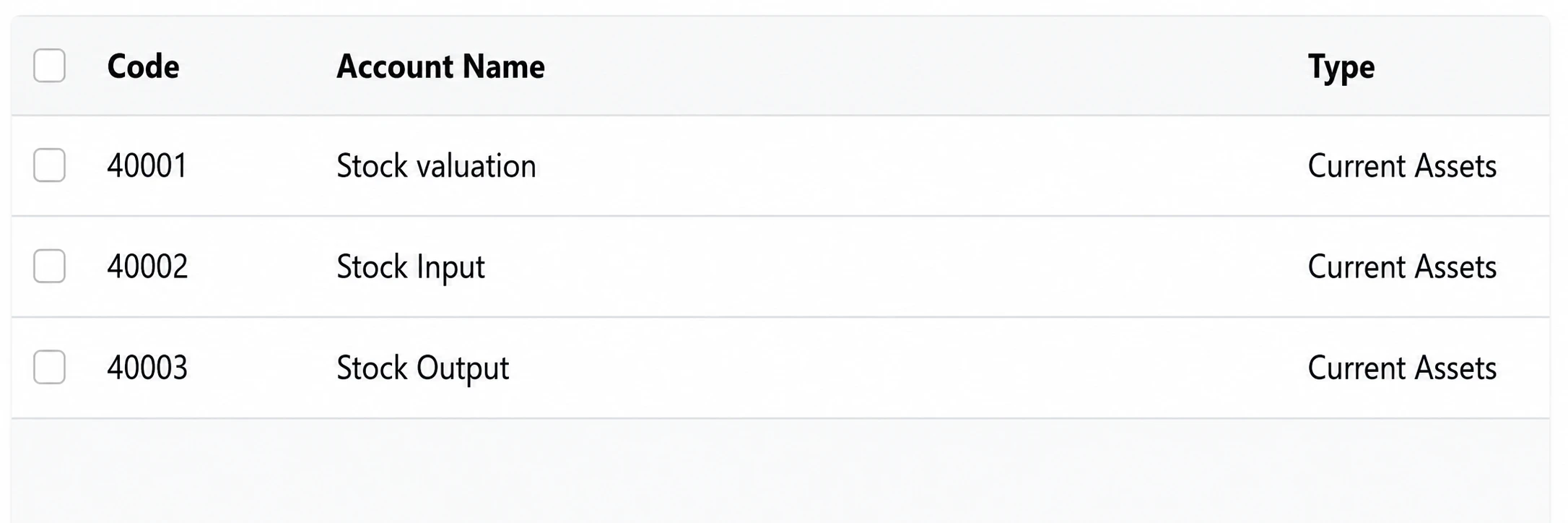
Each of these are defined at product category level and directly impacts how journal entries are generated.
Step by step configuration configuration of product category ;
-
Navigate to product categories
Go to: Inventory → Configuration → Product Categories
Create a new category or edit an existing one
-
Set the Costing Method
Choose the appropriate costing method based on your business:
-
Standard Price : Fixed Cost, manually updated
-
FIFO : Cost is based on the order of incoming goods
-
Average Costing: Cost recalculated after each purchase.
For most real-time valuation scenarios, FIFO or AVCO is recommended.
-
Enable Automated Inventory valuation
Set Inventory Valuation to : Automated
This ensures that every stock movement automatically generates accounting entries.
If this is set to manual, no real time accounting entries will be posted, which can lead to mismatches between stock and financial data.
-
Configure stock Account
If inventory valuation is set to automatic, Account stock properties section will appear.
This is most critical part
-
Stock Valuation Account
Represents the value of inventory in your balance sheet
Should be a current Asset account.
-
Stock Input Account
Temporary account used when goods are received but vendor bill is not yet created
Typically a current asset account
-
Stock Output Account
Used when goods are delivered but customer invoice is not yet issued.
Also treated as an interim account.
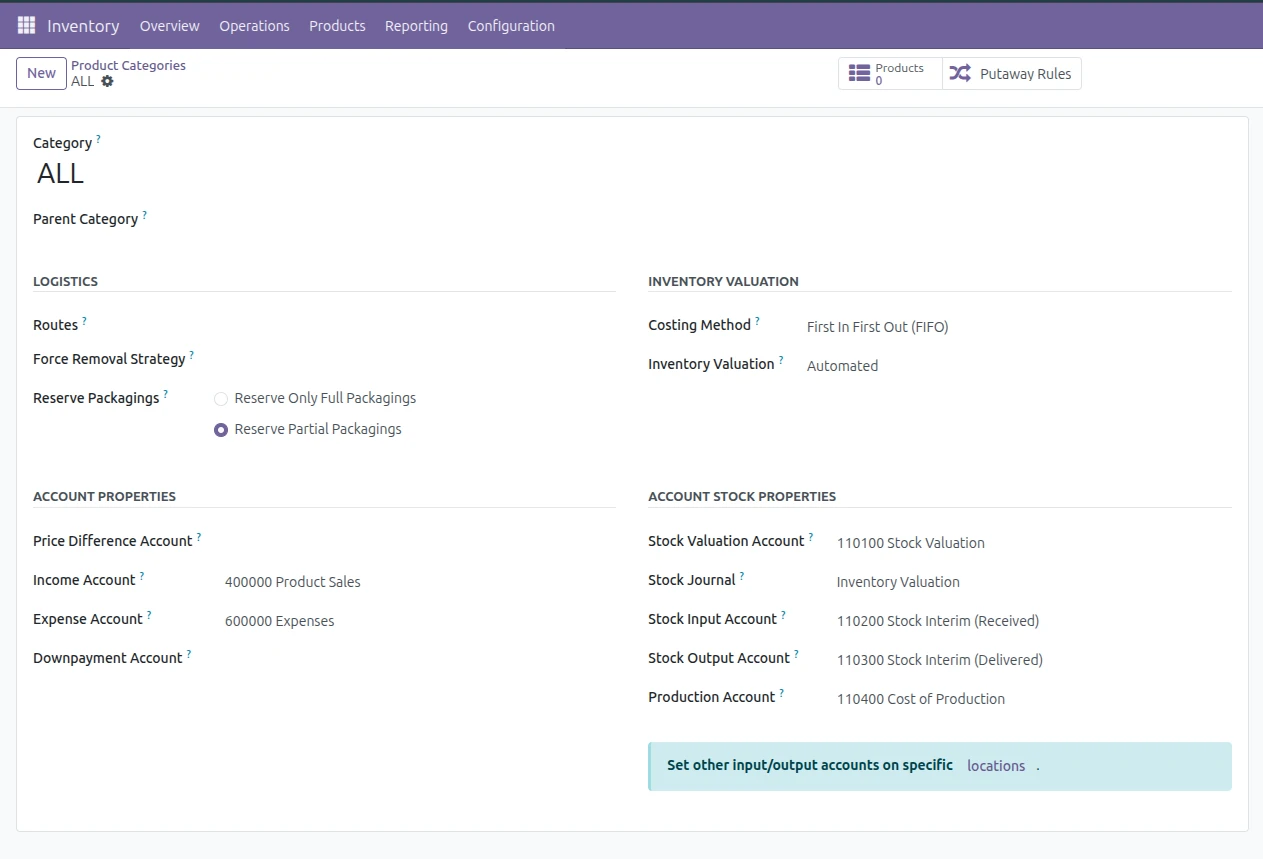
These accounts ensure proper tracking of stock during transitions between operations and accounting.
How inventory valuation works in Odoo
Let us break it down with a simple flow
Scenario 1 : Receiving Goods (Before vendor Bill)
When Goods are received:
-
Debit : Stock Valuation Account
-
Credit: Stock Input Account
This reflects that inventory has increased, but the supplier invoice is not yet recorded.
Scenario 2 : Creating Vendor Bill
When the vendor bill is created:
-
Debit : Stock Input Account
-
Credit : Accounts payable.
This clears stock input account and records liability.
Common mistakes and their impact
-
Incorrect Account Types : If the stock valuation account is not set as current asset, your balance sheet will be incorrect.
-
Missing Automated Valuation : Without automated valuation stock movements will not reflect in accounting which will leading to discrepancies.
-
Wrong interim accounts : improper configuration of stock input/output will result in unbalanced journal entries
-
Changing configuration after transactions : If you modify the category configuration after the transactions have already been recorded,it will not update existing entries.This will create inconsistencies.
Best Practices for accurate inventory valuation
- Always configure product category properly before using product in sales or purchases.
- Before going with live database, ensure the JE entry impacts are as expected
- Ensure that accounts mapping aligns with your company’s financial structure and compliance requirements.
Handling Configuration Changes
If you realize that inventory valuation was not enabled earlier, simply updating the product category is not enough. Existing stock will not reflect accounting automatically.
In such cases, you may need to perform physical inventory adjustments
Conclusion :
Configuring product categories in odoo 18 is not just a technical setup - it is just a foundational setup that directly impact both inventory management and financial accuracy. By carefully defining costing method, enabling automated valuation, and assigning the correct accounts, business can ensure that every stock movement is properly reflected in their books.



.jpg )


Leave a comment